
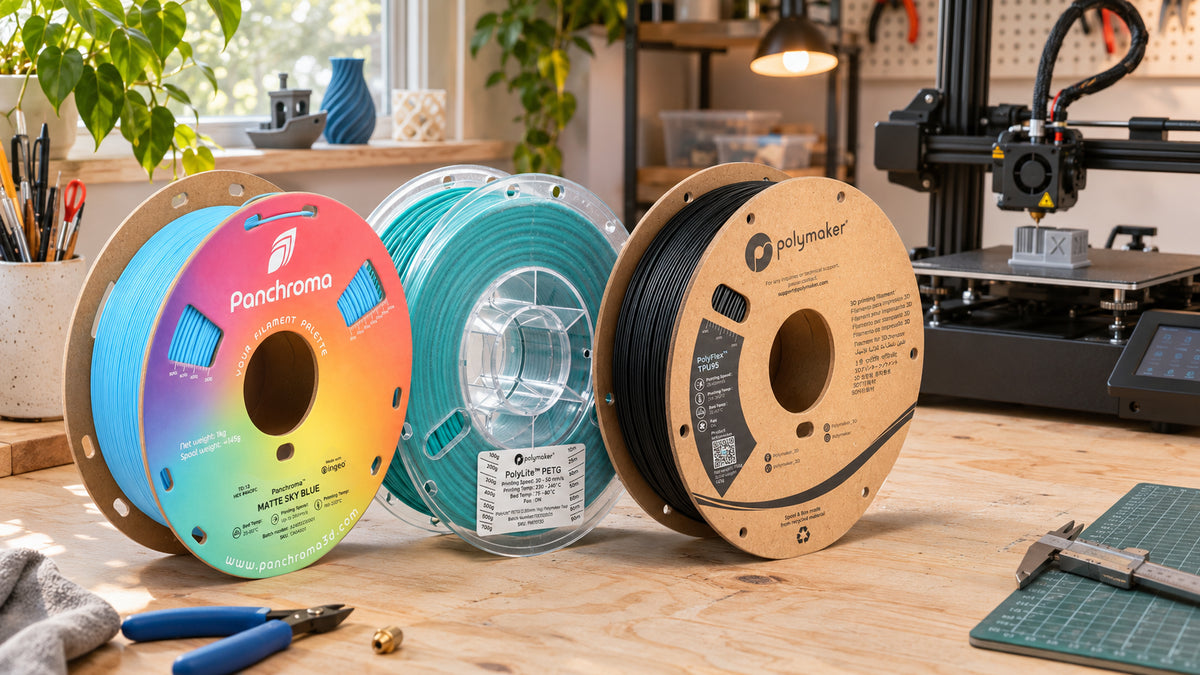
Every FDM print begins with a spool of material. Most desktop FDM prints begin with a spool of material. The extruder feeds the filament into the hotend, where it melts before passing through the nozzle and forming the model one layer at a time. Simple enough—but picking the right spool can be confusing once PLA, PETG, TPU, nylon, composites, and support materials enter the picture.
If your starting question is what is a 3D filament, this guide explains what it contains, how the main types differ, and what to check before buying one.
What Is 3D Printer Filament?

The simplest filament definition is a continuous strand of thermoplastic made for extrusion-based 3D printing. In FDM printing, the filament meaning is more specific: it is the feedstock that the printer pulls from a spool into its hotend.
Put another way, if you are wondering what is a filament, it is the raw material—not the finished model. The hotend melts the strand, while the nozzle places the softened plastic along a programmed path. Each new layer bonds to the one below it until the part is complete.
Most desktop printers use 1.75 mm filament, though some machines require 2.85 mm. Diameter matters. A spool with the wrong size will not work correctly with the printer’s extruder and hotend.
What Is 3D Printer Filament Made Of?
So, what is 3D filament made of? The short answer is a base polymer mixed with ingredients that adjust its color, appearance, processing behavior, or mechanical properties.
Common Polymers Used in 3D Printer Filament
The base polymer determines most of the material’s behavior. PLA offers easy printing and good surface detail. PETG adds toughness and better temperature resistance, while ABS and ASA suit parts that need more heat resistance. TPU bends and stretches. Nylon and PC target more demanding mechanical applications.
These names describe material families, not identical formulas. Two products labeled PETG or PLA can still print and perform differently.
Additives, Fillers and Reinforcements
Manufacturers add pigments to create color and use other additives to adjust flow, toughness, speed, gloss, or flame resistance. Fillers can produce a wood, stone, metal, or sparkle effect.
Chopped carbon or glass fibers serve a different purpose. They can increase rigidity and improve dimensional stability, but they also make the filament abrasive. A wear-resistant nozzle is usually required.
How Filament Composition Affects Material Properties
A small change in formulation can alter strength, flexibility, layer adhesion, heat resistance, and surface finish. PLA Pro, for instance, does not behave exactly like standard PLA, even though both belong to the same material family.
This is why the material name alone is not enough. Check the exact product’s technical data, recommended profile, nozzle requirements, and drying instructions.
What Are the Different Types of 3D Printer Filament?

The main 3D printer filament types range from beginner-friendly materials to engineering polymers that need specialized hardware. The right category depends on what the part must do after it leaves the build plate.
Common 3D Printer Filament Materials
PLA
PLA is a practical starting point for new users. It prints with relatively little warping, captures small details well, and comes in a wide selection of colors and finishes.
The category now covers far more than basic PLA. Matte formulas reduce glare, silk products create a reflective finish, and PLA Pro targets tougher everyday parts. The PLA filament collection includes options for general models, functional prints, and appearance-focused projects.
PETG
PETG sits between easy-printing PLA and more demanding engineering plastics. It offers useful toughness, impact resistance, and layer bonding, making it a good fit for brackets, equipment housings, and workshop accessories.
Stringing is a common issue, so temperature, travel moves, and retraction may need adjustment. Different PETG filament formulations also vary in speed, clarity, and stiffness.
ABS and ASA
ABS handles impact and heat better than standard PLA, which makes it useful for mechanical components and equipment enclosures. It can warp as it cools, so an enclosed printer often produces better results.
ASA prints in a similar way but holds up better under sunlight and weather exposure. That gives ASA filament an advantage for outdoor brackets and exterior parts, while ABS filament remains a common choice for indoor functional components.
TPU
TPU bends, stretches, and absorbs impact, making it useful for phone cases, seals, vibration dampers, flexible joints, and wearable parts. Printability becomes more challenging as the material gets softer because highly flexible filament can buckle or bind inside the feed path.
For projects that need flexibility without moving into an extremely soft material, PolyFlex TPU95 offers a practical middle ground. Its 95A Shore hardness balances elastic behavior with more manageable feeding, making it suitable for protective parts, flexible connectors, and other everyday functional prints.
Nylon and PC
Nylon handles repeated movement and wear well, which suits gears, hinges, bushings, and mechanical connectors. Moisture is the catch. An exposed spool can absorb water quickly, so drying and protected printing often become part of the workflow. The nylon filament range includes unfilled and reinforced formulations for different load requirements.
PC, or polycarbonate, brings high strength, rigidity, and temperature resistance. It also needs higher printing temperatures and tighter environmental control than PLA or PETG. Review the requirements of the exact polycarbonate filament before assuming a desktop printer can handle it.
3D Printer Filament Comparison
|
Filament |
Common Uses |
Main Advantages |
Limitations and Requirements |
|
PLA |
Models, prototypes, decorative prints |
Easy printing, clean surface finish |
Limited heat and impact resistance |
|
PETG |
Brackets, housings, functional parts |
Toughness and strong layer bonding |
Can string; profile tuning helps |
|
ABS |
Mechanical parts and enclosures |
Impact and heat resistance |
Warping; enclosure recommended |
|
ASA |
Outdoor and automotive parts |
UV and weather resistance |
Warping; ventilation required |
|
TPU |
Cases, dampers, flexible parts |
Elasticity and impact absorption |
Needs a controlled feed path |
|
Nylon |
Gears, hinges, connectors |
Toughness, wear and fatigue resistance |
Absorbs moisture; drying required |
|
PC |
Structural parts and engineering prototypes |
High strength and heat resistance |
High nozzle temperature; warping risk |
Fiber-Reinforced and Composite Filaments

Adding carbon or glass fiber can make a filament stiffer and help printed parts hold their dimensions under load. The reinforcement does not replace the behavior of the base polymer, though. PLA-CF, PET-CF, and PA-CF still differ in heat resistance, moisture sensitivity, impact performance, and printing requirements.
When a project calls for rigid tooling or mechanically loaded prototypes, Fiberon PA6-CF20 is one option to consider. It combines a PA6 nylon base with 20% carbon fiber for added stiffness and dimensional stability. Because the material is both abrasive and moisture-sensitive, it requires an all-metal hotend, a wear-resistant nozzle, and proper drying before use.
Specialty Filaments for Appearance and Function
Some filaments solve a visual problem rather than a structural one. Silk, marble, wood-effect, glow, translucent, gradient, and color-changing formulas can reduce the need for painting or post-processing.
Other specialty products target high speed, low weight, electrical conductivity, flame resistance, or electrostatic discharge protection. Read the product requirements closely; a special effect may also change nozzle wear, flow, or part strength.
Support Materials for Complex Prints
Support filament holds up overhangs, bridges, and internal features that the main material cannot print in open air. Breakaway supports are removed by hand, while soluble materials dissolve in water or another compatible solution.
Compatibility is not automatic. The support material must bond well enough during printing without becoming permanently fused to the model.
How to Choose the Right 3D Printer Filament
Start with the finished part, then work backward to the spool. This keeps material selection tied to an actual need instead of an impressive product description.
Purpose and Application of Your Print
A decorative model may only need good detail and color. A gear needs wear resistance, while an outdoor bracket must handle sunlight, rain, and temperature changes.
Ask how the part will be used, what loads it will carry, and whether failure would create a safety risk. Those answers quickly narrow the options.
Material Properties and Performance Requirements
Compare stiffness, toughness, flexibility, heat resistance, chemical resistance, and weather exposure. These terms are not interchangeable.
So, what is the strongest 3D printer filament? There is no single answer because strength can refer to stiffness, impact resistance, tensile strength, or fatigue performance. Carbon-fiber nylon may provide high rigidity, while an unfilled nylon can perform better under repeated bending or impact. “Strongest” only makes sense after defining the load and environment.
3D Printer Compatibility
Check the required nozzle temperature, bed temperature, enclosure, and hotend construction. Abrasive composites need a wear-resistant nozzle; high-temperature polymers may need an all-metal hotend.
Spool size and filament diameter matter too. A material can have ideal properties and still be the wrong choice if the printer cannot feed or melt it reliably.
Environmental Conditions and Filament Storage
Think about both the printing room and the part’s final location. Humidity affects materials such as nylon, TPU, PVA, and PETG, while heat and ultraviolet light matter after printing.
Storage conditions should be part of the buying decision. A demanding material may require sealed storage, active drying, or direct feeding from a dry environment.
Tips for 3D Printer Filament Beginners
A reliable first print comes from matching a manageable material with a simple model and a tested profile. Build experience one variable at a time.
Start with Easy-to-Print Materials
PLA is usually the easiest starting point. PETG makes sense after you understand first-layer height, nozzle temperature, cooling, and retraction.
Save flexible, fiber-reinforced, or high-temperature materials for later. They add hardware, drying, and profile requirements that can hide basic printer problems.
Follow Recommended Printing Settings
Use the manufacturer’s profile as a starting point rather than copying a setting from an unrelated spool. Formulations differ, even within the same polymer family.
Stay within the recommended temperature range first. Once the printer produces a stable result, make small changes based on a temperature tower or another controlled test.
Test and Adjust Before Large Prints
Run a small test before committing a full spool and several hours to a large model. Check first-layer adhesion, overhangs, dimensional accuracy, stringing, and layer bonding.
Change one setting at a time. If temperature, speed, flow, and retraction all move together, you will not know which adjustment helped.
Store Filament Properly Between Printing Sessions

A sealed bag or container with fresh desiccant slows down moisture absorption. It cannot remove water that has already entered the filament.
Users who keep several open, moisture-sensitive spools may benefit from PolyDryer™. Its Dry Dock uses 360-degree airflow for active drying, while the removable box supports sealed storage and direct feeding. This keeps drying and day-to-day storage in the same workflow instead of leaving the spool exposed again.
Conclusion
3D printer filament is not just plastic on a spool. Its base polymer, additives, fillers, and manufacturing quality shape how it prints and how the finished part performs. Start with the application, confirm printer compatibility, and follow the exact product profile. That approach will narrow the options faster—and prevent a lot of failed prints.
FAQ
Can You Use Different Brands of Filament in the Same 3D Printer?
Yes, as long as the filament diameter and material requirements match the printer. Switching brands may still require changes to nozzle temperature, flow, cooling, or retraction because each formulation behaves differently.
Why Does 3D Printer Filament Keep Breaking?
Filament may snap because it has become brittle from moisture, age, ultraviolet exposure, or heat. A tight feed path or excessive spool tension can also cause breakage. Dry the spool when appropriate, then inspect the path from the holder to the extruder.
What Causes Filament to Jam in a 3D Printer?
Common causes include a clogged nozzle, excessive heat creep, the wrong printing temperature, damaged filament, or a restricted feed path. Filled materials can also clog a nozzle that is too small for their particles.
Can 3D Printer Filament Be Recycled?
Some thermoplastic filament can be recycled in specialized programs, but most curbside systems do not accept loose filament or failed prints. Material mixtures, pigments, fillers, and contamination make sorting harder. Check local rules or a dedicated 3D-printing recycling service before disposal.