
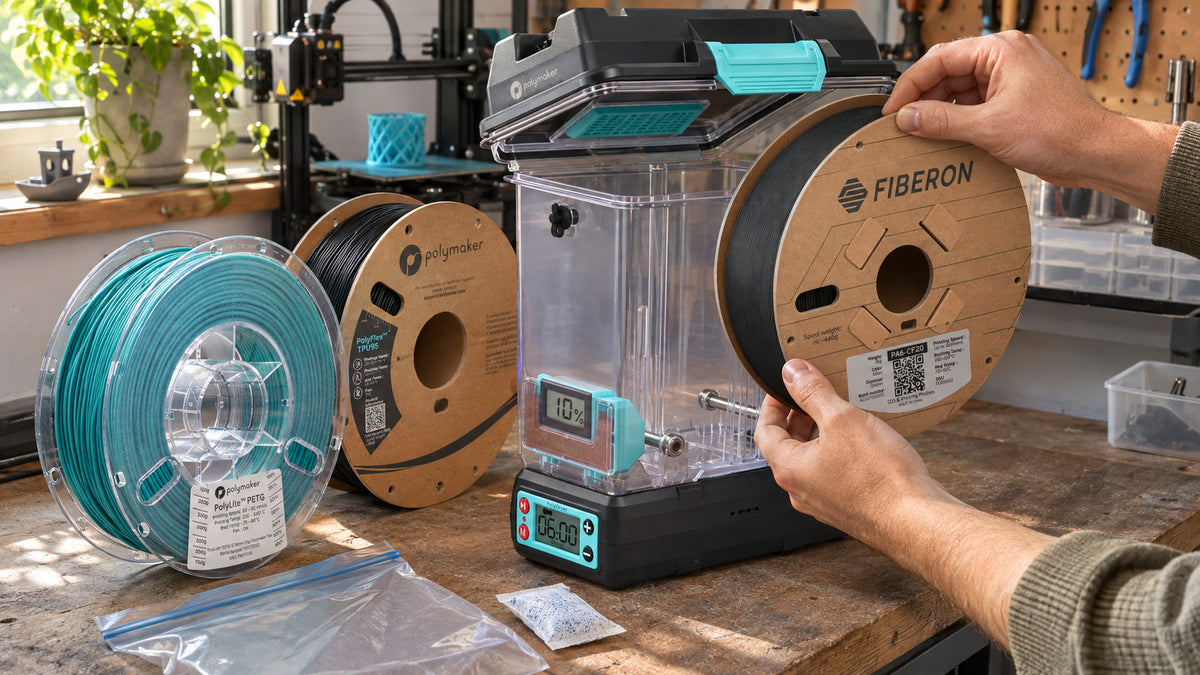
A spool that ran perfectly last week may suddenly pop at the nozzle, leave fine strings, or produce rough, weak layers. Before changing the slicer profile, think about where the filament has been stored. If it has spent several days in a humid room, moisture may be the real problem—and no retraction or temperature adjustment can pull water out of the plastic.
The spool needs to be dried, then kept away from damp air. A filament dryer for 3D printing handles the first step with controlled heat and airflow, while many models also protect the material during use. Below, we’ll look at how these dryers work, which filaments need them most, and what to check when choosing one for your setup.

What Is a 3D Printer Filament Dryer?
At its simplest, a 3D printer filament dryer is a warm storage box for your spool. If a roll of PETG has been sitting in a damp garage, a few hours inside can help it print cleanly again. Set the temperature and timer, and the dryer handles the rest. Many models also let you feed filament directly into the printer. With less moisture, you’ll usually get smoother extrusion, fewer strings, and a cleaner finish.
How Does a 3D Printer Filament Dryer Work?
Inside a 3D printing filament dryer, controlled heat encourages absorbed moisture to leave the material, while airflow distributes that heat and carries humid air away from the spool. Temperature or power settings and a timer keep the process within an appropriate range for the filament.

Heat Draws Moisture Out of the Filament
Moisture does not remain only on the filament’s surface; it can move into the polymer itself. As the material warms, the absorbed water migrates outward and evaporates. The goal is to provide enough heat to support this process without softening the filament or deforming the spool.
Air Circulation Distributes Heat Around the Spool
A tightly wound spool will not dry evenly if only one area receives warm air. In dryers with active airflow, a fan circulates heat around the roll so both the exposed layers and the material deeper in the spool experience more consistent conditions.
Released Moisture Must Be Removed or Managed
Once water vapor leaves the filament, it increases the humidity inside the chamber. Depending on the dryer’s design, that moist air may be vented, exchanged, or managed through another moisture-control method. Without this step, humidity can remain trapped around the spool and slow the drying process.
Temperature and Time Controls Regulate the Drying Cycle
No single setting works for every filament. Material type, spool weight, starting moisture level, and dryer design all affect the required cycle. Whether the unit uses direct temperature settings or preset power levels, follow the manufacturer’s profile for the exact filament rather than simply choosing the hottest or longest option.
Which Filaments Need Drying Most?

Not every spool reacts to humidity in the same way. Some 3D printer filament types can sit out for a while with few problems, while others begin absorbing moisture soon after opening. Polymaker’s wet filament guide lists nylon, PVA, TPU, and PETG among the more moisture-sensitive materials. PLA usually lasts longer in open air, though a damp workshop or garage can still cause trouble over time.
PLA, ABS, and ASA: Dry Them When Problems Show Up
Fresh PLA normally prints well straight from a sealed package. An older spool may be a different story. If it suddenly starts popping, stringing, or leaving rough patches, try drying it before changing your usual print profile.
ABS and ASA can also pick up moisture after sitting out for weeks. Still, don’t blame the spool too quickly. Incorrect nozzle temperature, poor flow calibration, or a hardware issue may produce many of the same defects.
PETG and TPU: Dry Them More Often
Moisture problems tend to show up sooner with PETG filament and TPU filament. You may hear popping at the nozzle or notice fine strings, small bubbles, uneven lines, and a rough finish.
TPU can even take on moisture during a long print. On humid days, it often helps to dry the spool first and feed it from a dryer or sealed dry box while the printer runs.
 Nylon and PVA: Keep Them Protected
Nylon filament and PVA-based support filament need closer attention. Dry each spool using its product-specific settings, keep it covered during printing, and seal it again as soon as the job ends.
For an overnight print, feed the material from a dry box or compatible heated dryer. Otherwise, it may absorb enough moisture to affect the print before the final layers are complete.
PC and Fiber-Reinforced Filaments: Check the Base Material
Polycarbonate filament and carbon fiber reinforced filament do not all share one drying routine. With composites, the base polymer usually matters more than the carbon fiber itself.
PA-CF, PET-CF, and PLA-CF may need very different temperatures and drying times. Check the instructions for the exact product instead of borrowing settings from another spool with “CF” in its name.
Which Filament Dryer Setup Fits Your Workflow?
The best setup depends on what happens at your printer each day. A hobbyist drying one roll of PETG now and then won’t need the same equipment as a print farm switching between several materials. Available desk space and the need to keep filament covered during printing also matter.
Single-Spool Dryers for Everyday Use
A single-spool dryer is usually enough for occasional home printing. It fits beside most printers and makes direct feeding easy without taking over the workbench.
Don’t rely on a “1 kg compatible” label alone. Spool widths and diameters vary between brands, so check the chamber measurements against the rolls you already own. The spool should fit without rubbing and have enough room to turn freely.
Multi-Spool Dryers for Busier Setups
Printing with several colors or running dual-material jobs? A multi-spool dryer can prepare more than one roll at a time and cut down on waiting.
More capacity doesn’t always mean better drying, though. Warm air still needs to reach each spool, and every roll needs enough clearance to rotate. Check the feed paths as well. Filaments that cross or pull against one another can cause drag during a print.
Dryer-and-Storage Systems for Direct Feeding
For an overnight nylon or TPU job, moving a dry spool onto an open holder can undo part of the drying work. A combined dryer-and-storage system keeps the roll covered and feeds filament straight to the printer. This setup works well with nylon, PVA, TPU, and other materials that quickly pick up moisture.
A 3D printed filament dryer usually means a DIY enclosure made with printed spool holders, brackets, or feed ports. These parts can work well for storage and spool handling. Adding active heat requires more care: use heat-resistant materials, reliable temperature controls, and properly protected electrical components.
How to Choose a 3D Printer Filament Dryer

When shopping for a 3d print filament dryer, start with the spools on your shelf—not the biggest temperature number on the product page. A dryer may get hot enough for nylon but still perform poorly if the spool barely fits, the chamber heats unevenly, or the feed path creates too much drag.
Check the Settings Your Filaments Need
Write down the materials you use now, along with any you plan to try later. Then compare their recommended drying profiles with the dryer’s temperature range, timer, power levels, and operating modes.
Take a closer look if you print with nylon, PVA, PC, or engineering composites. A roll may fit inside the chamber even though the dryer cannot reach or hold the conditions that material needs.
Measure Your Spools
The words “fits 1 kg spools” don’t tell you much about the available space. Brands use different spool widths and diameters, so check the actual chamber measurements. Leave enough clearance for the roll to turn without scraping the walls.
Planning to print directly from the dryer? Look at the outlet position, rollers, and PTFE tube route. The filament should unwind with little resistance and no sharp bends. This is especially important with TPU, which may stretch or buckle when the feed path is too tight.
Look Beyond Maximum Temperature
Good drying depends on more than heat. Warm air needs to reach the whole spool, and the moisture released from the filament needs somewhere to go. Check how the unit circulates air and handles humidity inside the chamber.
Product reviews are more useful when the test conditions match your own. A dryer that handles a nearly empty PLA spool in an air-conditioned room may behave differently with a full roll of nylon in a humid garage.
Keep the Controls Simple
Clear material profiles and an easy-to-set timer take some guesswork out of drying. A built-in hygrometer can also show whether chamber humidity is rising or falling. Just remember that it measures the air near the sensor, not the water still trapped in the middle of the filament.
Think about what happens after the cycle, too. Placing a dry spool back on an open holder exposes it to room humidity again. PolyDryer™ avoids that extra move by pairing the Dry Dock with a removable PolyDryer Box. After drying, the spool can stay sealed for storage or feed directly into the printer—handy when you regularly switch between opened, moisture-sensitive materials.
Tips for Using a 3D Printer Filament Dryer Effectively
Drying a spool is only one part of the job. The filament also needs a clear path to the printer and a sealed place to go when the print ends. A few simple habits can keep it from getting damp again.
Use the Profile for the Exact Filament
Start with the instructions on the product page or packaging. Two spools labeled PETG may use different additives, so a setting that works for one brand may not suit the other.
Some dryers use power levels instead of temperatures. In that case, stick with the manufacturer’s material chart rather than trying to guess the temperature behind each level.
Don’t Add Extra Heat “Just to Be Safe”
A hotter, longer cycle isn’t always better. Too much heat may soften the filament, change its shape, or warp the spool until it no longer turns smoothly.
Still seeing strings after the recommended cycle? Check the airflow, spool position, and selected mode before turning up the heat. The dryer may not be the problem at all. Nozzle temperature, retraction, flow calibration, and worn printer parts can cause similar symptoms.
Test the Feed Path Before a Long Print
Before starting an overnight job, spin the spool by hand and check that it doesn’t rub against the chamber. The filament outlet should have a smooth edge, while the PTFE tube should follow wide curves without sharp bends.
Pull a short piece of filament through the full path. It should move with little effort. If you feel it catching, fix the problem before printing—soft TPU can stretch, buckle, or stop feeding when there’s too much resistance.
Seal the Spool After Drying
A dry spool starts taking in moisture again as soon as it returns to humid air. Print directly from the dryer or a dry box when possible. Otherwise, place the spool in an airtight container or storage bag with fresh desiccant.
This matters most for nylon, PVA, and TPU. In a damp garage or workshop, leaving one of these materials on an open holder may undo hours of drying.
Keep the Dryer Clean
Check the desiccant indicator from time to time. Regenerate or replace the beads once they become saturated. It also helps to clear away filament scraps, wipe out dust, and make sure the rollers, vents, and outlets remain free of debris.
Follow the care and safety directions for your specific unit. The PolyDryer operating manual covers its power levels, operating modes, desiccant care, sealing steps, and safety precautions.
Conclusion
A filament dryer can solve many of the problems caused by a damp spool, from nozzle popping to rough surfaces and uneven extrusion. Pick one that fits your materials, spool sizes, and usual printing routine—not just the model with the highest temperature. Once the cycle ends, keep the spool sealed or print from a dry enclosure. Otherwise, the moisture may return before your next job.
FAQ
Does Every 3D Printer Need a Filament Dryer?
No. It depends more on the material and storage conditions than on the printer itself. Someone using PLA in a dry, air-conditioned room may only need a dryer occasionally. If you regularly print with nylon, PVA, PETG, or TPU, it will probably see much more use.
Can I Use a Food Dehydrator as a Filament Dryer?
Yes, provided it maintains a suitable temperature, circulates air well, and has enough room for the spool to turn. Check the actual temperature with a separate thermometer if possible. Once used for filament, the dehydrator should no longer be used for food. A purpose-built dryer is usually easier for direct-feed printing.
How Long Should Filament Stay in a Dryer?
There’s no single drying time for every spool. A half-used roll of PETG may dry faster than a full spool of wet nylon. Material formulation, spool size, moisture level, room humidity, and dryer design all affect the timing. Start with the filament maker’s instructions and the dryer’s recommended profile.
How Often Should You Use a Filament Dryer?
Dry a spool when it begins popping, stringing, or extruding unevenly, as well as after it has been stored in questionable conditions. Nylon, PVA, and other moisture-sensitive materials may need drying before each use and protection throughout the print. Good sealed storage means fewer repeat cycles.
Can a Filament Dryer Restore Old or Brittle Filament?
Sometimes. If moisture made the filament brittle, drying may bring it back to usable condition. It won’t repair damage caused by UV exposure, overheating, dirt, or permanent breakdown of the plastic. When a properly dried spool still snaps easily or prints poorly, replacing it is usually the safer choice.